Sunday, July 8, 2018

How to Find Your system Specification

How to Find Your system Specification

Knowing what your computer's "specs" (Specifications) and can help you make informed software and hardware purchases. it can also help you narrow down technical problems when you know the exact model of all of your hardware. you can quickly find your system specs in an operating system.


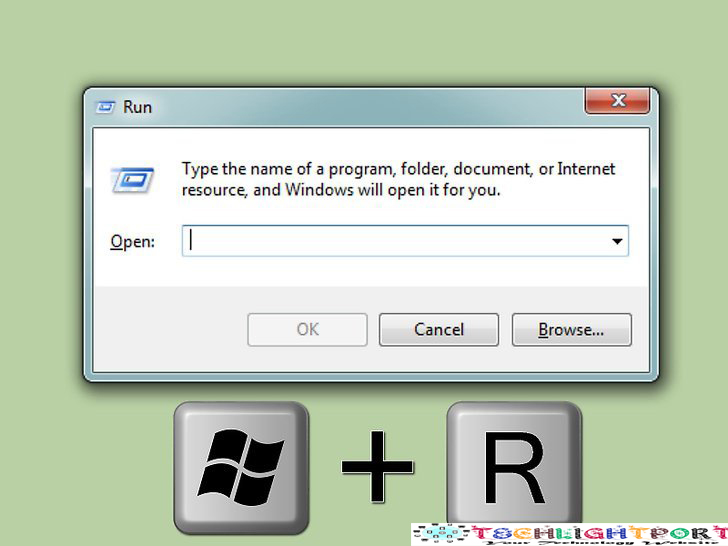
1. Open the Run dialog. you can find this in the Start menu or by pressing Win+ R.


2. Type Msinfo32 and press enter  this will open the system information

3. Review the system summary to find your basic information. there are several notable entries in the system summary screen, which is the default view when you launch the system information window.

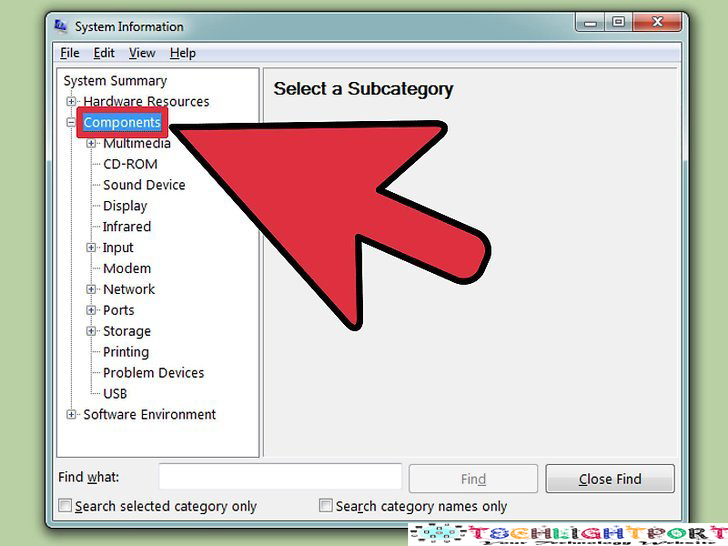
4. Expand the "Components"section. the components section will let you see details about our graphics card and hard drives.

5. Select "Display". This will show the graphics card that you have installed. If your motherboards has integrated graphics and you have a graphic card installed, you'll see two different sets of specifications.

6. Expand the "Storage" section and select "Drives". This will display the amounts of free space and total storage space on all of your installed drives and partitions.

7. Explore the other section.

8. Export the file for troubleshooting.  if you're working with a technician to troubleshoot our computer, they may want to see a document of your computer specs.


"Hope this help you! comment your for problems, suggestion and and troubleshoot" 

How To change Music=Cover With Your Android Phone

How To change Music Album Art Cover With Your Android Phone

Hello today i am going to show you how to  How To change Music Album Art Cover With Your Android Phone simple and easy.

Quick Summary of What We Are Going to Do


  1. Install Album Art Grabber
  2. Open Album Art Grabber
  3. Tap a song or Album
  4. Select the Song source (MSD/Phone memory)
  5. Tap the Album cover 
  6. Tap set.
  1. Install Album Art Grabber from Play store. it's free app that scans Music websites fir album artwork. To install the app, open the play store (the multicolored triangle icon in the app drawer), then search for album art grabber. When you locate the app, tap INSTALL.
 2.  Open Album Art Grabber. it's the gray record icon in the app drawer. depending on your settings, you may also find it on your home screen

    3. Tap a song or album. this opens the "choose image from" window.

    4. Select a source. Album Art Grabber can grab Album art from LastFM, MusicBrainz, or you SDcard. Once selected, A window containing matching result will apear.

    5. Tap the Album art you want to use. A confirmation window will appear.

    6. Tap "SET". The album is now connected to the selected song or album 


    "Hope this post helped you Comment for any challenges or problem"

    Friday, July 6, 2018

    Protect with Dread Desease Cover


    Imagine for a moment how your family would survive is you fell seriously ill and were unable to work. How would your bills be paid if you could not work? Would your medical aid pay all your hospital bills? Would you have to use your savings to keep your family afloat and cover medical experiences? With a dread disease cover in place you know that you and your family are financially protected against dread diseases.

    Even the healthiest person, one who works out regularly, eats the right foods and does not smoke or drink could fall seriously ill. How often do you hear of a young man struck down in his prime by a heart attack or health fanatic that falls victim to cancer? While we must do what we can to protect ourselves against serious illnesses we must also face up to the reality that illness waits around the corner for all of us and that we must do what we can to protect ourselves financially against dread diseases.

    Replace and Revise Health Insurance


    This is not an hard fix and just another way to keep the American people bamboozled and baffled. One thing that bad been done right to a certain degree was when insurers use to calculate and follow the underwriting process. Underwriting is a process when insurers would get information from the medical information bureau to review your medical history to determine risk tolerance. Today, this process has been eliminated, therefore, insurance companies do not know who they are insuring which causes ridiculous premiums. One way to lower premiums again is to simply allow the underwriting process to begin again. No one's premiums should be higher then their monthly mortgage, even if the entire family is insured. Insurers need to have the freedom once again to underwriting people who are in good health and adjust monthly premiums based in consumers risk factors.

    There is much talk about tax credits, the rising cost of insurance, social economics barriers, and the possibility of medicaid being phased out altogether by the year 2023.  These topics raise a concern. Where and how are people going to afford any type of insurance? In particular, how will those earning minimum wage and are not part of group coverage through their employer health plans afford insurance? The above complexities and legal jargon being used today is just another way to cause confusion.

    Getting Health Insurance in an Emergency


    Do your due diligence before you receive an ER bill and also check the hospital's financial assistance guidelines. While many folks assume this is only for non-insured or low-income situations, there typically is an option for insured to under-insured patient as well. You must meet their guidelines to qualify.

     Necessary ER Visits

    There is lot of grey area here but the affordable care act defines an emergency as anything that "a prudent layperson, possessing an average knowledge of medicine and health" would believe to be emergent and in need of immediate attention.

    That leaves it to patient to self diagnose and then decide which is the most prudent place to go. Of course, it does not help that ER staff and doctors often cannot determine if an ER visit is necessary without examining the patient and possibly performing additional tests to rule out a condition.

    True Emergencies

    While coughs, sore throats, and headaches are usually not emergencies, the reality is that the journal of American medicine discovered that six of the top ten symptoms of real emergencies.

    A Guide to an Individual Personal Accident Insurance


    Among a number of insurances in the market, an accident insurance is a special insurance in the sense that is really designed to protect finances in the event of an any accident. When you get involve in an accident, the extent or the degree of  severity is unknown and so anything under the sun can happen.

    In saying that then the burden gets to be heavier simply because since the mishap happened when the family is financially struggling then comes additional expenses for the medical treatment brought about by the accident. Or even worse is the fact that someone in the family died and there is no source of income. With an accident insurance you are assured that you are covered in the needs of your family.

    So in getting an accident insurance like any other insurance, you will have to consider what your requirements are. If your work environment tells you to get the premium type then consider it. Both types are good in comparison to having none at all, but at the end of the day the type you get will also dictate the experience you will go through in the event that you will require the use of your insurance.

    STEPS ON HOW TO FORMAT A LAPTOP COMPLETELY


    STEPS ON HOW TO FORMAT A LAPTOP COMPLETELY


    1ST METHOD

    Reformatting your Laptop with Installation CDs
    If you have become frustrated with the performance of your laptop because of too many installed programs, an overgrown system registry or a malicious software infection, the fastest way to restore its original performance is with a complete hard drive format. However, this process is complicated and can result in loss of data or inability to get your operating system and programs back if you forget a critical step. Confirm that you have all of the software needed to restore your computer, and then use your recovery disc or Windows installation disc to format the hard drive and re-install Windows.

    Step 1

    Confirm that you have the Windows product key for your laptop. If you purchased the laptop with Windows pre-installed, the Windows product key is generally on a sticker affixed to the bottom of the computer.

    Step 2

    Check that you have the ability to reinstall Windows. You need a Windows installation disc or the recovery disc for your laptop. If your laptop did not include a physical disc, it stores the original system files on a hidden hard drive partition. Confirm that the partition works by pressing a keyboard shortcut displayed on the screen such as "F8" or "F10" during startup. Your computer should also include a utility allowing you to burn the system files on a recordable DVD.


    Step 3

    Check that you have all of the software and driver discs needed to install your programs and hardware device drivers. If you downloaded some of your software from the Internet, find the installation files and save them on a removable storage device.

    Step 4

    Back up all of the data on your laptop's hard drive. You can use a free program such as Clonezilla or DriveImage XML to clone the hard drive on an external drive. If you do not have a hard drive large enough to hold all of the data on your laptop, you can back up the most important files manually. However, formatting your laptop will remove this data. If you forget something, it will be difficult or impossible to recover.

    Step 5

    Insert the Windows or recovery disc, and restart your laptop. If you are using the hidden recovery partition, restart the laptop and immediately press the shortcut key displayed on the screen. Follow the instructions displayed on the screen to install Windows or perform a full system recovery, and return your laptop to its original state.

    2ND METHOD

    Reformatting a Laptop Using Restoration Partition
    1

    Restart your computer. While the machine is rebooting, repeatedly press the F10 key on your keyboard until the machine boots. This will take you into the partition offering you options for repair or restore (reformatting and reloading).

    2

    Select the option for installing a fresh system. The beauty of this system is that you don't have to do anything else. The restore partition will completely run the program to format, reload the OS, install drivers and install all of the original software that came with your laptop.

    3

    Wait for the reformat to complete. This process will usually take around 30 minutes to complete.